Delete Your Account
Delete your GoLevel account in the app. Deletion is immediate.
Important: Deleting your account is permanent. We do not retain your data after deletion.
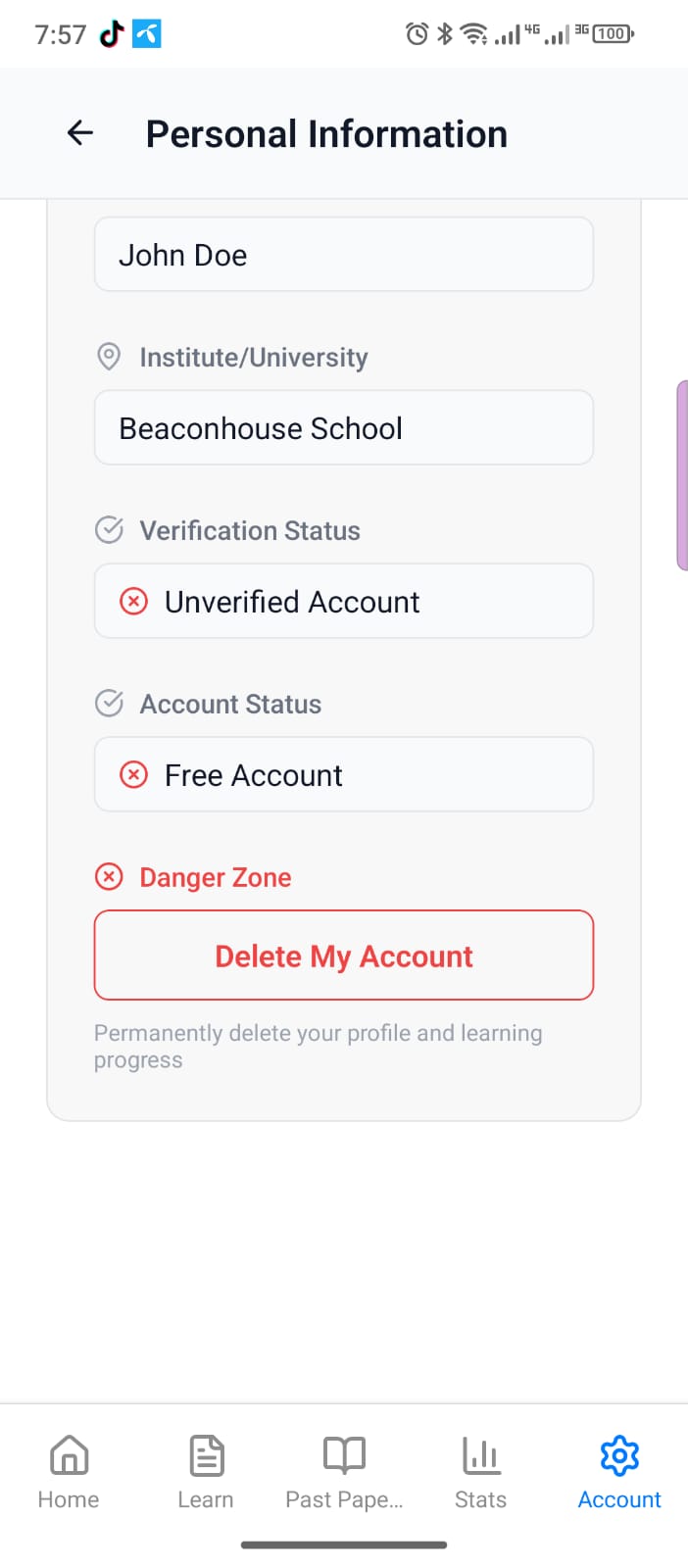
Delete in the App
From the App (Required)
- Open the GoLevel app
- Go to Account → Personal Information → Delete Profile
- Follow the prompts to confirm deletion
How It Works
- 🔐 One-tap delete from your profile
- ⚡ Immediate confirmation and removal
- 🧹 Clean slate — no retained data after deletion
Data Deleted
- Email address
- University information (e.g., institution, program, year)
- Display pictures pulled from Discord or Google
- Profile information (name, preferences)
- Learning progress, analytics, and saved content
- App-specific settings and history
Data Retention
We do not practice data retention after deletion.
Timeline
Deletion is immediate once you confirm in the app.
Account Deletion FAQ
Can I undo deletion?
No. Once confirmed and processed, deletion is permanent.
Do I need the app?
Yes. Account deletion is handled in the GoLevel app under Account → Personal Information → Delete Profile. Web or email requests are not supported.
What gets removed?
Your email address, university information, display pictures pulled from Discord or Google, profile preferences, learning progress, and app history.
Need Help?
For assistance with your request, contact our team:
- Email: privacy@golevel.com
- Support: Support Center
- Contact Form: Contact Us